
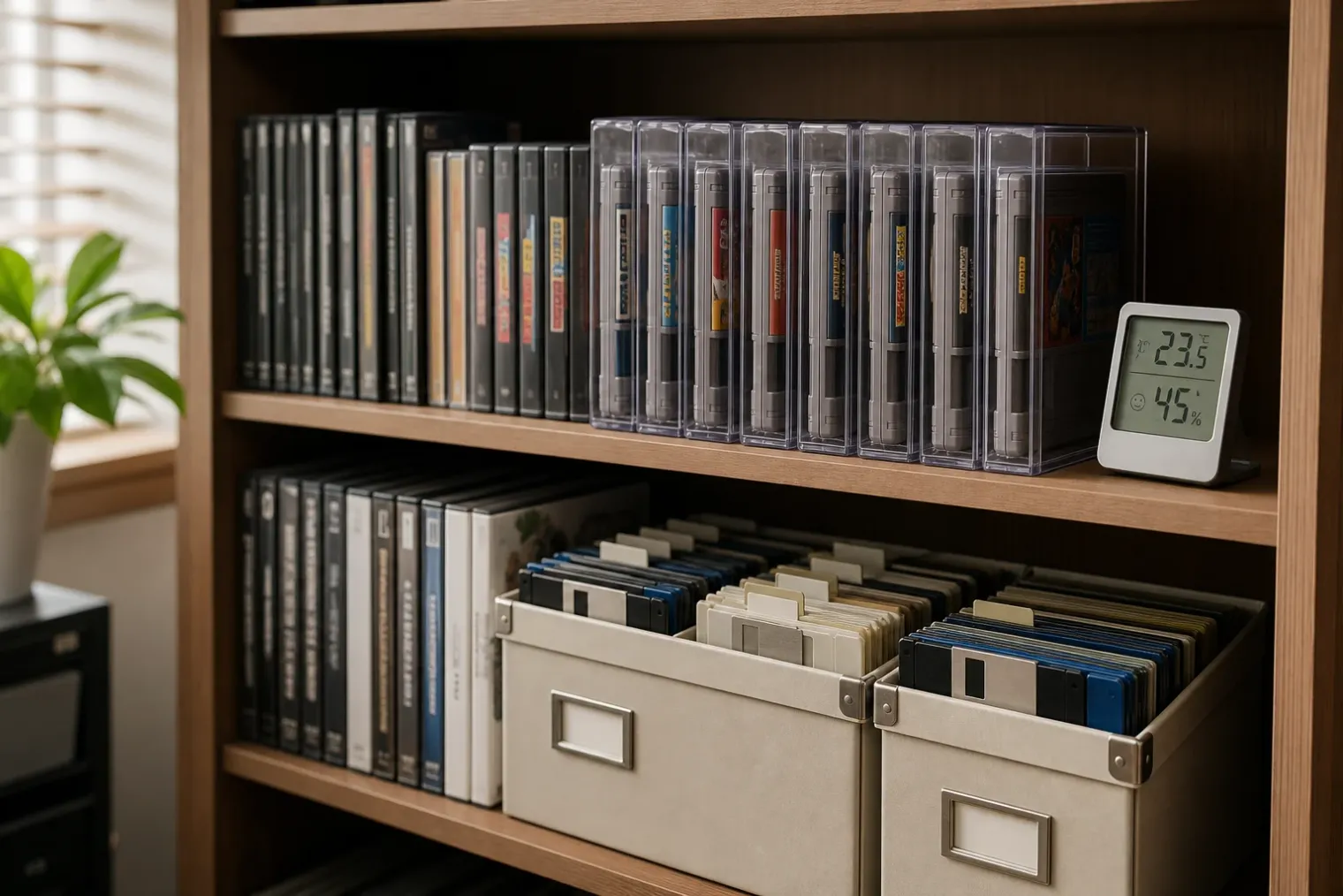
The game is not just the disc or cartridge
A physical game collection has two preservation problems. The first is keeping the object intact: its disc, cartridge, floppy disk, box, manual and labels. The second is retaining access to what it contains. A flawless floppy disk is of limited use without a compatible drive, while a cartridge with an intact shell may still depend on ageing electronics or a depleted save battery.
That distinction matters because no single storage rule covers every game format. Optical discs, magnetic floppies and solid-state cartridges fail in different ways. Their packaging also has historical and collector value in its own right. The practical aim is therefore not to make a collection museum-perfect, but to reduce avoidable damage and identify the items whose data or condition should be secured first.
For most home collections, the best starting point is mundane rather than specialised: a clean, cool, relatively dry room with stable conditions. Attics, garages, sheds and damp basements are poor choices because heat, moisture, direct light and repeated temperature swings accelerate deterioration. Storage close to radiators, air vents, exterior walls prone to condensation, or speakers and electrical equipment should also be avoided.
Stable storage beats elaborate storage
Archives commonly recommend a cool and stable environment with moderate relative humidity. For a household collection, a room at or below normal room temperature, around 35 to 40% relative humidity where practical, is a sensible target. Absolute precision is less important than avoiding persistent dampness, excessive heat and rapid changes.
A cupboard in a climate-controlled living area is usually safer than a cellar or loft. Keep media off the floor to reduce flood risk, leave air space around shelving, and avoid overpacking boxes. Direct sunlight can fade cover art, yellow plastics and add unnecessary heat. Dust is not merely cosmetic: it can scratch media during handling and contaminate older drives.
Original boxes and cases are often useful protection, provided that they are dry, structurally sound and free of mould. For items without cases, use appropriately sized protective cases or inert sleeves rather than stacking loose media. Never seal an item that is already damp or mould-affected into an airtight container; isolate it and allow the surrounding environment to be made dry before seeking specialist advice for valuable material.
Optical discs: protect the layers, not only the reading side
CDs, DVDs and Blu-ray discs are layered objects, not indestructible slabs of plastic. Their reflective and data layers can be affected by scratches, bending, heat and the separation of layers. Recordable discs can be more vulnerable than factory-pressed game discs because their recording layers vary by material and manufacture.
Store discs vertically in standard jewel cases, keep-cases or other cases that hold them securely by the centre hub. A case that lets a disc slide around offers little protection. Avoid large stacks of loose discs, paper sleeves that abrade surfaces, and pressure from tightly packed shelves.
Handle every disc by its outer edge and centre hole. Fingerprints and skin oils on the reading surface can interfere with playback, while the label side of some CDs is closer to the reflective layer than collectors may expect. Adhesive labels are a poor preservation choice: removing one can damage a disc’s layers. If identification is essential for a recordable disc, use only an appropriate water-based permanent marker on the clear hub area, not a ballpoint pen or solvent-heavy ink.
Do not make cleaning a routine ritual. First remove loose dust carefully. If a disc needs cleaning, work from the centre straight outwards rather than around the circular track, and use a method suitable for optical media. A disc that is cracked, peeling, severely scratched or showing unusual discoloration should be copied or assessed promptly rather than repeatedly tested in a drive.
Floppy disks: fragile media and scarce readers
Floppy disks combine physical vulnerability with a serious access problem. Their magnetic surface can be damaged by dust, bending, pressure, moisture and poor-quality drives. They should remain in their protective jackets or cases, stored upright rather than compressed under the weight of other objects.
Keep floppy disks away from strong magnetic fields, although ordinary household exposure is less likely to erase them than popular lore suggests. The larger risks are heat, humidity, dirt and damaged mechanisms. Do not place heavy objects on disks, flex them, touch exposed media, or insert a valuable disk into an unclean or unknown drive.
For rare games, demos, saved games or personal development material, the priority should be creating and verifying a digital image with suitable hardware and software. The original disk should still be retained as an artefact, together with its packaging and a clear note of what was copied, when, and with which equipment. The image is an access copy and insurance policy, not a replacement for the original object.
Cartridges: preserve contacts, shells and saved data
Game cartridges have no optical or magnetic surface exposed during normal use, so they often appear more durable. Yet their plastic shells can warp or crack in heat, labels can fade or lift, and exposed connector contacts can gather dirt or oxidise. Store cartridges individually in original cases where possible, or in fitted protective cases that prevent contact damage and keep dust away from the edge connector.
Avoid inserting and removing a cartridge unnecessarily, particularly when its label, shell or connector is already compromised. Do not scrape contacts with abrasive tools. If a game does not load, the problem may lie with the console, the cartridge contacts or internal components; aggressive cleaning can turn a recoverable issue into lasting damage.
Some older cartridges use an internal battery to retain save files, clocks or other data. The game program itself may remain intact when a battery fails, but the stored save data can disappear. Where saves matter, document them while they are accessible and investigate a professional or well-understood replacement process before the battery becomes an emergency. Any intervention should be weighed against the value of preserving the cartridge in original condition.
Preserve access as well as objects
The most important preservation step is often inventory. Make a simple list of significant games and note their format, condition, region, required hardware, accessories, known faults and whether a backup or disk image exists. Photograph unusual labels, box contents and serial markings. This record helps establish priorities if a collection is damaged, sold, moved or inherited.
The highest-priority items are usually unique rather than expensive: home-made disks, saves, prototypes, regional releases, annotated manuals, rare add-ons and games with evidence of data loss. Test these selectively on clean, maintained hardware. Frequent use is not automatically preservation, especially where a failing mechanism could damage a carrier.
Digital copies also need preservation. Keep verified files on at least two different storage media in separate locations, and review them periodically. File names, checksums, notes on how images were created, and copies of relevant manuals can be as important as the files themselves. Storage devices and file formats change; migration is an ongoing task, not a one-time backup.
A realistic collector’s routine
A sustainable approach is more valuable than a complex one that will not be maintained:
- Keep games in a clean, stable interior room, away from sunlight, moisture and extreme heat.
- Return discs, cartridges and floppies to fitted cases immediately after use.
- Store discs and floppy disks vertically, without tight compression or heavy loads.
- Handle optical discs by the edges and hub; avoid stickers and harsh cleaning.
- Use clean, serviced playback hardware for valuable media.
- Inventory important items and create verified access copies where lawful and technically possible.
- Review batteries, backups and the availability of compatible hardware before access becomes difficult.
Physical games can outlast the systems that introduced them, but only if collectors treat the carrier, its data and its means of playback as one connected preservation problem. A cool cupboard and careful handling will prevent many failures; thoughtful copying, documentation and maintenance are what keep the games accessible.
Sources
- Vaše hry vás môžu prežiť - Ako správne skladovať disky, cartridge a staré médiá — Sector.sk
- Care, Handling, and Storage of Audio Visual Materials — Library of Congress
- Caring for audio, video and data recording media — Canadian Conservation Institute
- Reformatting FAQ — Library of Congress
- Digital Storage Media — National Park Service


